
On March 31, 2026, Anthropic accidentally shipped the entire source code of Claude Code — their flagship AI coding agent — inside an npm package. A missing .npmignore entry exposed a 59.8 MB source map containing 512,000 lines of unobfuscated TypeScript across roughly 1,900 files. Within hours, the code was mirrored, dissected, and rewritten in Python and Rust by thousands of developers worldwide.
This post synthesizes insights from the leaked source, official Anthropic documentation, community analyses, and the Chinese-language CCB documentation project to present the clearest picture yet of how Claude Code actually works under the hood.
What Makes Claude Code Different
Claude Code is not a chatbot wrapper or an IDE plugin. It is a terminal-native agentic coding system — three words that each carry architectural weight:
- Terminal-native: A CLI application built on React/Ink for terminal rendering, not Electron or a browser.
- Agentic: The AI autonomously decides which tools to invoke and in what sequence.
- Coding system: Purpose-built for the full software engineering lifecycle with complete shell access.
The critical differentiator from tools like Cursor, Copilot, or Aider is that Claude Code has unrestricted shell access, paired with a sophisticated permission system that makes that power safe.
The 6-Layer Architecture
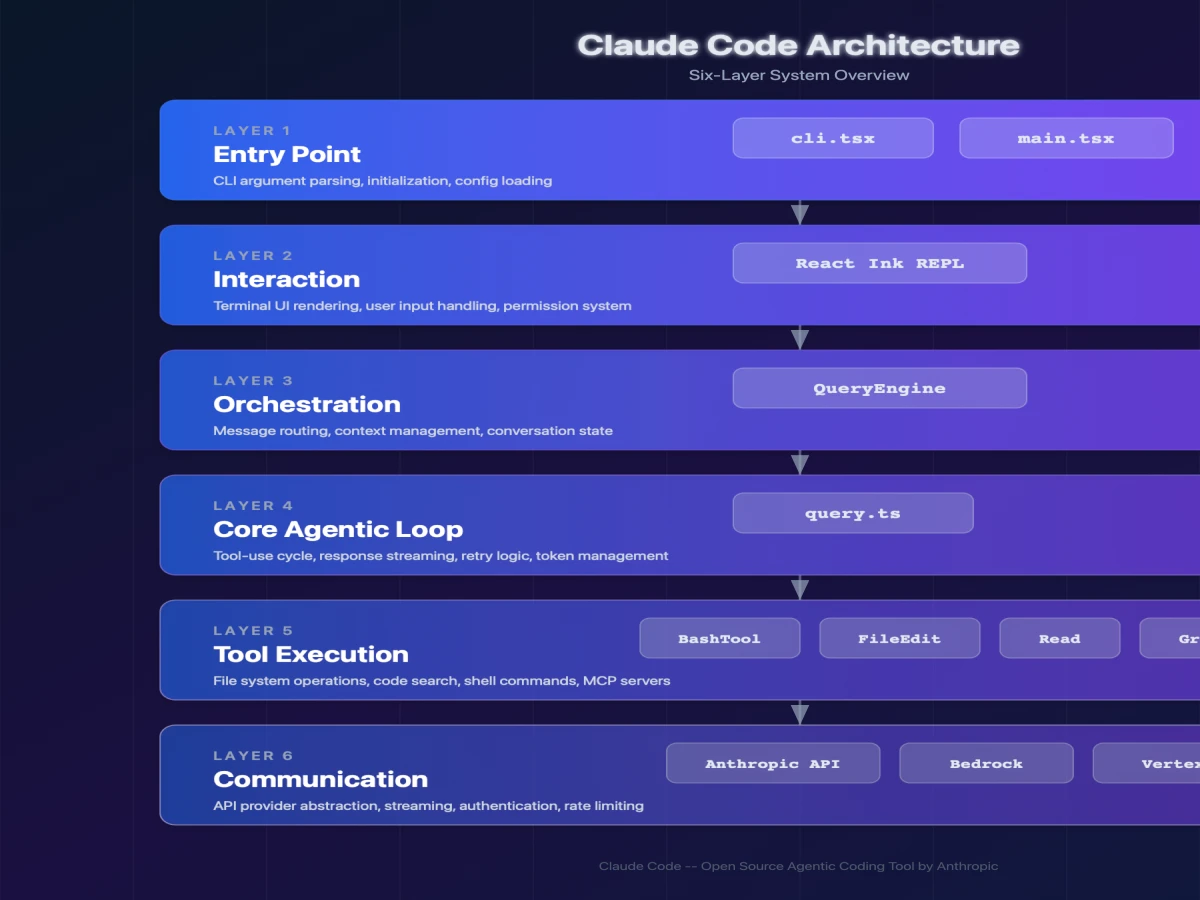
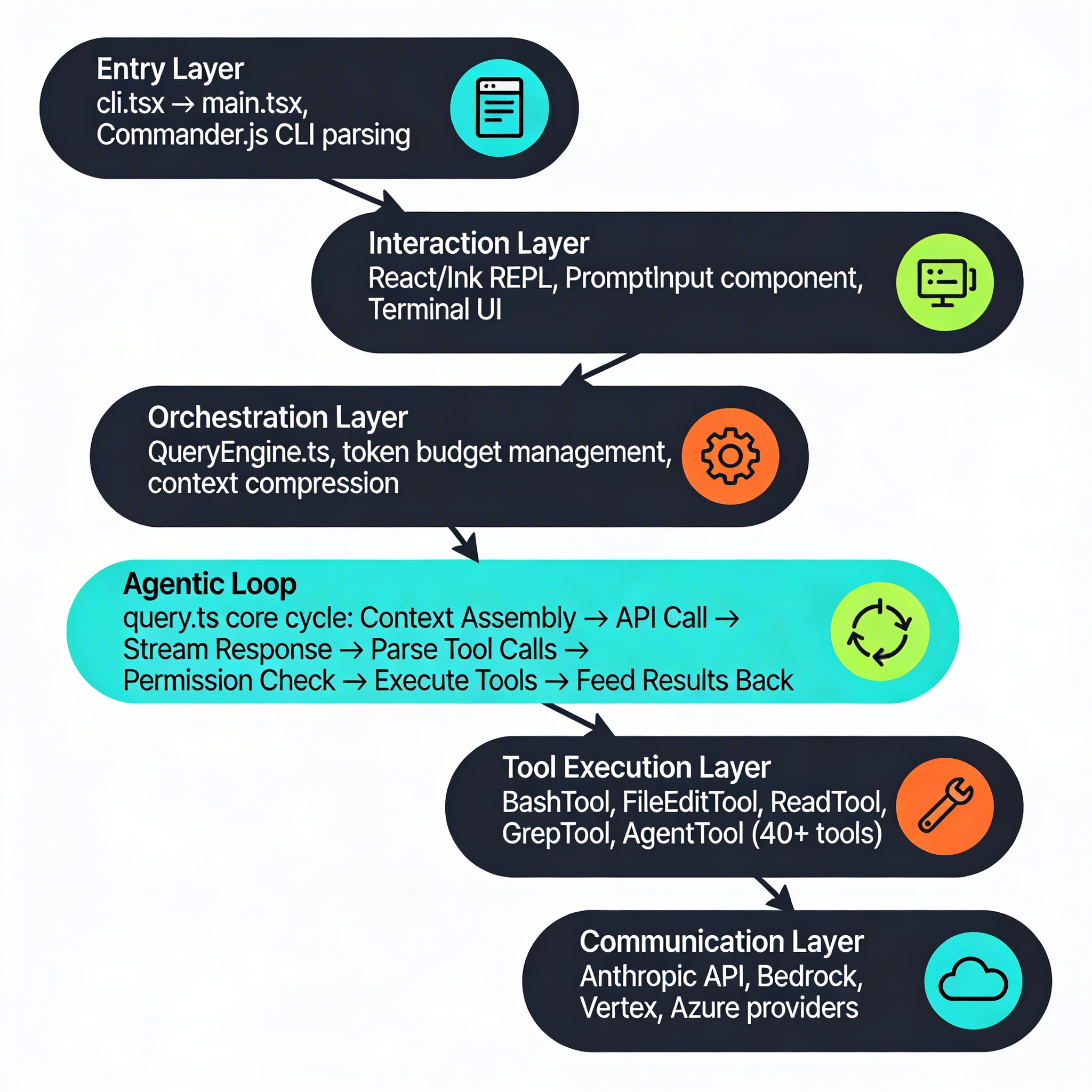
The codebase follows a clean layered architecture. Each layer has a single responsibility and communicates only with its immediate neighbors.
Layer 1 — Entry Layer
The true entry point is src/entrypoints/cli.tsx, which performs three initialization steps:
- Runtime polyfill injection — a
feature()function for capability detection. - Build-time macro injection —
globalThis.MACROcontaining version and build metadata. - Build target declaration — sets
BUILD_TARGET = "external"andINTERFACE_TYPE = "stdio".
Control passes to src/main.tsx, which parses CLI arguments via Commander.js, initializes authentication and telemetry, loads tools via getTools(), and launches either the interactive REPL or pipe mode (-p).
Layer 2 — Interaction Layer
The terminal UI is built with React and Ink — a framework that renders React components to terminal output. This is the same component model as React for the web, but instead of DOM nodes, it renders to ANSI escape codes.
The PromptInput component captures user input and adds it as a UserMessage to the conversation session. This design means the TUI has state management, re-renders, and component composition — game-engine techniques applied to a terminal.
Layer 3 — Orchestration Layer
This is the largest single file in the codebase: 46,000 lines of TypeScript. QueryEngine.ts manages:
- Turn lifecycle and iteration limits
- Token budget tracking and enforcement
- Context compression triggers (three-layer strategy)
- Retry logic and rate limit handling
- Streaming error recovery
The rationale for keeping everything in one file is that all model-API-adjacent logic is reasoned about together — retries, rate limits, budget management, and streaming errors form a cohesive unit.
Layer 4 — Core Agentic Loop
This is the heart of the system. The cycle runs as follows:
Assemble Context → Call API → Stream Response → Parse Tool Calls
       ↑                                              ↓
       └──── Feed Results Back ← Execute Tools ← Permission Check
The loop terminates when the model returns a text-only response with no tool calls. The return type is a discriminated union called Terminal that encodes exactly why the loop stopped: normal completion, user abort, token budget exhaustion, stop hook intervention, max turns, or unrecoverable error.
Key technical characteristics:
- Streaming-first: API responses arrive as Server-Sent Events and render incrementally.
- Multi-tool turns: Claude can chain multiple tool calls per API response.
- Errors as feedback: Denied tools return error
ToolResultmessages fed back to the model, which can adapt and choose alternatives.
Layer 5 — Tool Execution Layer
Every capability is exposed through a plugin-like tool layer with 40+ self-contained, permission-gated modules. The base tool definition spans ~29,000 lines. Each tool implements a rich interface covering:
| Aspect | Description |
|---|---|
| Identity | Name, description, JSON schema |
| Execution | The actual implementation logic |
| Permissions | Required permission level for invocation |
| Concurrency | Whether it can run in parallel |
| Rendering | How results display in the terminal UI |
Layer 6 — Communication Layer
Handles streaming HTTP communication with multiple providers: direct Anthropic API, AWS Bedrock, Google Vertex, and Azure endpoints. The primary entry point weighs 785KB, and the runtime is Bun (not Node.js).
The Agentic Loop in Detail
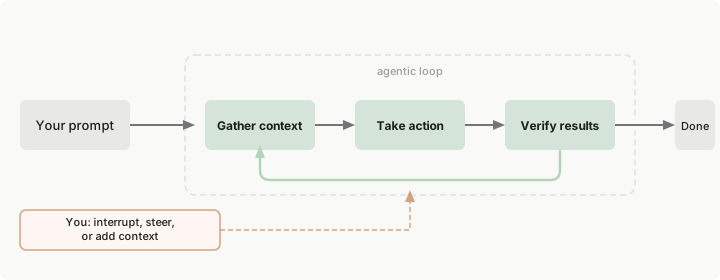
When you give Claude a task, it works through three blended phases:
- Gather context — read files, search code, check git state.
- Take action — edit files, run commands, make changes.
- Verify results — run tests, check outputs, validate changes.
Here is a concrete example of a debugging session showing autonomous multi-turn tool use:
| Turn | Decision | Tool Call | Result |
|---|---|---|---|
| 1 | Check error output | Bash("bun run dev 2>&1 | head -30") | TypeScript errors found |
| 2 | Locate source file | Read("src/utils/foo.ts") | Source code retrieved |
| 3 | Search type defs | Grep("interface Foo", "src/") | Type locations found |
| 4 | Apply fix | FileEdit(old_string, new_string) | Code modified |
| 5 | Verify fix | Bash("bun run dev 2>&1 | head -10") | Build passes |
Each step is autonomously decided by the model. The harness only provides the tools and permission checks — it never dictates the sequence.
The Tool System
Tools are organized into five categories:
| Category | Capabilities |
|---|---|
| File Operations | Read files, edit code, create/rename files |
| Search | Find files by pattern, search content with regex |
| Execution | Shell commands, run tests, git operations |
| Web | Search the web, fetch documentation |
| Code Intelligence | Type errors, jump to definitions, find references |
The architecture is a clean three-layer stack:
- Tool Registry — defines JSON schema and required permission level.
- Dispatcher — routes tool calls by name to implementations.
- Implementation — executes actual logic.
Critically, the AgentTool spawns sub-agents as standard tool calls — no special orchestration layer, no separate process model. Sub-agents get their own fresh context window, restricted tool sets, and cannot spawn further sub-agents, preventing recursion loops.
Claude Code is also deeply integrated with MCP (Model Context Protocol) — in fact, it is MCP. Every capability, including Computer Use (internally codenamed "Chicago"), runs as an MCP tool call.
The Permission Pipeline
With full shell access, security is paramount. The permission system uses a pipeline of escalating cost:
Static Rules (instant) → Mode-Based Check (instant) → LLM Classifier (slow) → User Prompt (blocking)
Each layer can short-circuit with an allow or deny:
- Static rules — allow/deny lists checked instantly.
- Mode-based check — the current permission mode determines baseline.
- LLM classifier — in auto mode, a separate lightweight model call classifies the risk of the tool invocation against the conversation context.
- User prompt — if all else fails, ask the human.
The Rust rewrite distills permissions into five levels: ReadOnly, WorkspaceWrite, DangerFullAccess, Prompt, and Allow. Current permission level >= required level means allow; one level gap triggers a user prompt; larger gaps deny outright.
Users can cycle through permission modes with Shift+Tab:
- Default: Asks before edits and commands.
- Auto-accept edits: Edits without asking, still asks for shell commands.
- Plan mode: Read-only, creates a plan for approval.
- Auto mode: Background safety checks on all actions.
Three-Layer Context Compression
Managing the context window is one of the hardest engineering challenges. Claude Code implements a sophisticated three-layer strategy:
MicroCompact — Zero-Cost Local Trimming
Edits cached content locally with zero API calls. Old tool outputs are trimmed directly. Fast, cheap, transparent.
AutoCompact — Smart Summarization
Fires when the conversation approaches the context window ceiling. Reserves a 13,000-token buffer, then generates up to a 20,000-token structured summary. A built-in circuit breaker stops retrying after 3 consecutive compression failures.
Full Compact — Nuclear Reset
Compresses the entire conversation, then re-injects:
- Recently accessed files (capped at 5,000 tokens per file)
- Active plans and task state
- Relevant skill schemas
Post-compression, the working budget resets to 50,000 tokens.
Memory Architecture
The source reveals a three-layer memory system:
- MEMORY.md — a lightweight index of pointers (~150 characters per line) perpetually loaded into context. It stores locations, not data.
- Topic files — actual project knowledge distributed across files, fetched on-demand when the index points to them.
- Session transcripts — raw conversation history, searchable via grep for specific identifiers.
A "strict write discipline" ensures the agent updates its index only after a successful file write, preventing pollution from failed attempts.
Unreleased Features and Hidden Capabilities
The leaked codebase contained 44+ feature flags gating over 20 unshipped capabilities:
KAIROS — Autonomous Daemon Mode
Referenced over 150 times, KAIROS is an unreleased persistent background agent. It receives periodic <tick> prompts, maintains append-only daily logs, and subscribes to GitHub webhooks. It includes autoDream — background memory consolidation that merges observations, removes contradictions, and converts insights into facts.
ULTRAPLAN
Offloads complex planning to a remote cloud session running Opus 4.6 with up to 30 minutes of dedicated think time.
Anti-Distillation System
When the ANTI_DISTILLATION_CC flag is enabled, Claude Code injects fake tool definitions into API requests — decoy tools designed to corrupt training data anyone might extract from API traffic.
Other Notable Flags
- Interleaved thinking — thinking tokens interleaved with output.
- 1M token context window — extended context experiments.
- Fast mode (codenamed "Penguin") — speed-optimized inference.
- AFK mode — autonomous operation without user presence.
- Buddy — a Tamagotchi-style virtual pet companion in the terminal UI, with 18 species, rarity tiers, and stats including DEBUGGING, PATIENCE, CHAOS, WISDOM, and SNARK.
Multi-Agent Coordination
The system uses a coordinator/worker model with a mailbox pattern:
- Worker agents cannot independently approve high-risk operations.
- Requests escalate to the coordinator's mailbox.
- An atomic claim mechanism prevents two workers from handling the same approval simultaneously.
- All agents share a common memory space for coherent context.
Sub-agents serve as both a delegation primitive and a context-management primitive — their work happens in a fresh context window, and only a summary returns to the parent.
System Prompt Engineering
The system prompt is modular and cache-aware. It includes:
- Base instructions and behavioral guidelines
- Tool definitions (40+ tools with JSON schemas)
- CLAUDE.md project instructions (first 200 lines or 25KB)
- Auto-memory learnings from previous sessions
- Skill descriptions (full content loaded on-demand)
- MCP tool names (definitions deferred until use via tool search)
Tool definitions are deferred by default — only tool names consume context until Claude actually uses a specific tool. This is critical for scaling to dozens of MCP servers without blowing the context budget.
Key Architectural Principles
The analysis reveals several foundational design principles:
- Messages = State — The entire system state is an append-only message array. This enables persistence, replay, and compression as first-class operations.
- LLM-Determined Termination — The model decides when it's done — no hardcoded workflow graphs or state machines.
- Schema-Driven Tools — Every tool is defined by a JSON schema contract between the harness and the model.
- Errors as Reasoning Input — Denied tools don't crash — they become feedback the model reasons about.
- Architectural Safety — The strongest behaviors are system properties, not prompt decorations. A tool can be denied. A sandbox can block a subprocess. A hook can defer an action. These constraints exist at the architecture level.
Conclusion
Claude Code represents one of the most sophisticated agentic systems deployed at scale. Its architecture — a 6-layer stack with a 46K-line query engine, 40+ permission-gated tools, three-layer context compression, and multi-agent coordination — demonstrates that building reliable AI agents requires far more than wrapping an API in a chat loop.
The leaked source shows that the real engineering challenge isn't calling an LLM — it's everything around it: managing context windows, enforcing permissions, coordinating sub-agents, compressing history, and making errors useful rather than catastrophic.
Whether you're building your own agent system or simply trying to understand the state of the art, Claude Code's architecture provides a blueprint for what production-grade agentic AI actually looks like.
References
- The Claude Code Source Leak: 512,000 Lines, a Missing .npmignore, and the Fastest-Growing Repo in GitHub History — Layer5
- What is Claude Code — Source Code Analysis — CCB / Agent Aura
- Claude Code Architecture Deep Dive: What the Leaked Source Reveals — WaveSpeedAI
- Comprehensive reverse-engineering analysis of Claude Code's internal architecture — ComeOnOliver, GitHub
- Claude Code Architecture Explained: Agent Loop, Tool System, and Permission Model — Brooks Wilson, DEV Community
- How Claude Code Works — Anthropic Official Documentation
- Claude Code's source code appears to have leaked: here's what we know — VentureBeat
- Inside Claude Code: An Architecture Deep Dive — Zain Hasan
- Inside Claude Code: The Architecture Behind Tools, Memory, Hooks, and MCP — Penligent AI